Showing posts with label homeschool. Show all posts

Thursday

{Review} Classical Historian Go Fish Game


I am always looking for ways to get more "play" into our school day, so we were all excited to try The Classical Historian's Go Fish Game to see it if it lived up to our expectations.

About the Game:


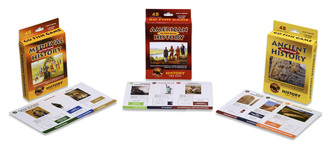
The Go Fish Game is a card game containing 50 cards depicting historical images in 12 different categories. Each set can be used to play 4 different games. The suggested ages are 5 and older (reading necessary)

  1.  Go Fish: This is the standard Go Fish we all grew up playing with a historical twist. Players must collect all 4 cards in each category before laying down their match.
  2. Collect the Cards: Players are read historical fact hints and try and guess which image is on the card.
  3. Chronology: Assemble the cards in chronological order in the fastest time!
  4. Geography: Players try to assemble all the cards under the correct continent in the fastest time.


What did we think?


We recieved the Ancient History version the the Go Fish Game. Cale and Cohen were excited to get started as soon as it arrived! The cards were well made, durable and nicely illustrated. They even stood up to my bunch who all seem to bend cards while playing games like these.


 What we liked best:

  • Go Fish is not my favorite game. Actually, my kids ask to play all the time and I usually suggest another game. To me it's always been sort of a pointless game, but I really enjoyed playing this with the kids. The historical facts gave a point to the game and added educational value. If you are going to play Go Fish go for one like this!
  • I liked that there were multiple games to be played with the deck. My oldest is too "old" for games like go fish, but does like trivia games so the Collect the Cards Game was right up his alley. Where as Go Fish suits the middle boys just fine.
  • The game does not overpower with factual information, but in the course of playing you learn historical association and facts. It is a gateway to finding more information. And questions like What is Stonehenge? or Who is Socrates? were heard often. 

What we had trouble with:


Over all we loved this game! And the kids have asked to play at least twice a week. The only thing  I had a little bit of a problem with was the hints given in the Collect the Cards version of the game were very vague and often only one or two words. The game has an opportunity to really teach what each of the images are about, if they only added a little more information to these hints.

Where to Buy:

 The Classical Historian offers 3 versions of the Go Fish Game: Ancient History, Medieval History and American History. They can be purchased for $11.95 each or $29.95 for all 3.


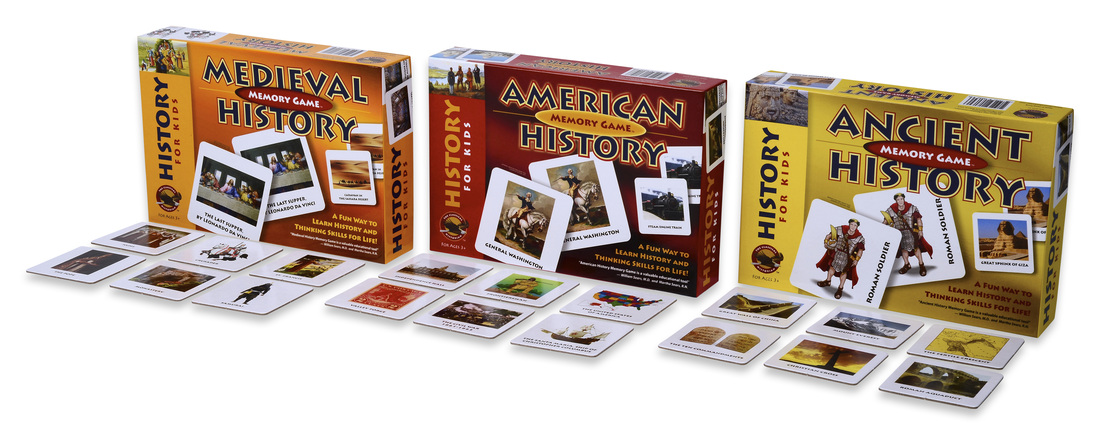
They also have a Memory Game version of the same 3 time periods which can be purchased for  $14.95 each or $39.95 for all 3. I think this looks perfect for the younger, non-reading set as well as the older kids.

The Classical Historian also offers a variety of complete history curriculum for grades 6 and up. See their website for full information.


Wednesday

{Review} My Home School Grades


At this point in our homeschooling journey, I don't really give that many grades. Actually the only thing that we grade is math and that is mostly because Teaching Textbooks does that for me. But I have never actually averaged all those lessons and tests up into a final grade. Nevertheless, when I was given the chance to try out My Home School Grades all it took was one look at their website for me to be excited to try it out. 

About the Product:


My Home School Grades is a very simple web application (accessible on your computer, smartphone or tablet). It's a way to keep track of your children's classes, grades and activities and in the end produce a very simple, professional transcript of their education. You can find all sorts of how-to videos on their website to get you started, but really they aren't needed since everything is laid out and very easy to navigate. 


You start by entering your student(s). Then you can add all of their classes. You can enter the class name, grade level, how many credits, if it's an AP/Honors course, if it's a Pass/Fail course, school year, subject, etc. My Home School Grades also made it very easy by providing some of the most common curricula for you, and if you are more of an unschooler or use a different curricula you can use the other/custom listing. 
Once you've added a class you can start adding grades. Simply type in the lessons, test, quizzes and the grade. You have option of grading by letter, fraction or by number. Based on your account settings final grades will automatically be shown as Percent number, Letter, or Letter +/-. Some of the curriculum choices have their lessons already names and listed so that all you have to do is enter in the grade. You also have the option of entering just a final grade, as well as entering the grades for those classes earned through dual enrollment.


All of the calculating has been done for you. You can also weight the lessons, quizzes, tests and labs differently in order to calculate the final grade in a way you want. I also wanted to point out the flexibility here- even if you are an unschooler or don't use a lot of pre-made curricula, your child will still need some sort of high school transcript in order to graduate. You can uses these 4 categories- lessons, quizzes, tests and labs- as any thing you want. To you they can mean anything you deem an important part of their learning process and gauge of their comprehension.


You can also add all of your child's extracurricular activities and achievements. You can choose for a pre-populated list that includes categories such as work, community service, Scouts, 4-H, school, church, etc. You can add a name and description to the activity as well as listing any awards and references to go with it.


The second part of My Home School Grades is the transcript. They take all of the information you enter over the years and create a very nice looking transcript listed by grade level. You can choose to start the transcript at any level or just include the High School years. You can export multiple transcripts so you can include a comprehensive, all grades one for your files and a more official high-school only one for graduation and college applications. Also included on the transcript are the calculated GPA, points and credits for each year as well as at graduation.

My Thoughts on this Application:

Honestly, I loved it. It was easy to set up, easy to navigate, and easy to use. Some of the things I liked most:
  • The fact that all the calculations are done for you. No matter how you enter the grades- fraction, percent, letter- in the end the grades are listed uniformly how you want them.
  • The customer service is wonderful! Any problems, questions, suggestions, etc you have I have no doubt the creators of this program will do what they can to help. They truly want this to be accessible and useable for all homeschoolers.
  • I loved the transcripts. It's part of who I am, but I have always loved the look of lists like these and I think their transcripts are done simply and beautifully with all the right information included. There is also just enough flexibility so that you can choose certain elements to include or leave out.
The only bad thing to come out of using this program is that now high school is very much on my mind. But I guess seeing as that next year is the last year before we move into high school I guess I should be starting to think about it a little more!

How to get it for yourself:


My Home School Grades is very affordably priced at $49.99 for a yearly membership! You can also pay monthly at a rate of $5.99/month. These rates include any future upgrades and additions to the application as well as unlimited students and free support. They offer a 30 day money-back guarantee, so you can see for yourself how great this application is and how it will work for your family!

**UPDATE: My Home School Grades  has made LOTS of changes and added many, many features since this review was written. My oldest is in high school now and this program has been so valuable in planning his high school classes, activities and keeping track of grades! **