Showing posts with label Mosaic Reviews. Show all posts

Saturday

{Review} Udderly Smooth Lotion


Since it's winter and the air is drier- especially in our wood-heated home- dry skin in on the rise. My hands usually end up cracked and red for most of the season, and my feet are 10 times worse than my hands year round. We also have a few eczema sufferers in the house- and again the cold winter air usually spurs an outbreak. I am actually usually pretty bad about buying and using lotions, but I was happy to be given the opportunity to try our Udderly Smooth's line of lotions to see how they did against my dry skin. 

About Udderly Smooth

According to their website:

"Made in the USA for over thirty years, Udderly Smooth® products contain rich moisturizing ingredients. Not your average moisturizing lotion- Udderly Smooth® can be used on Dry Skin, Cracked Skin, for Diabetes Foot Care, as a Facial Moisturizer, as a General Moisturizing Lotion and many other uses." 

I am sure if you have spent any time in the lotion aisle of your local stores you will have noticed Udderly Smooth. It's the tubes covered in black and white cow spots! It's hard to miss!

We received the following items to test out:

1- 4oz Hand Cream Tube
1- 2oz Hand Cream Tube
1- 12oz Body Cream Tub
1- 8oz Foot Cream Tub

I used the foot cream daily- twice if I remembered- and the hand cream multiple times a day.


My Thoughts on Udderly Smooth

Udderly Smooth is very creamy. It is not petroleum based so there is no oily residue to get on your skin or clothes after applying.

What I liked most:
  • I like that the lotion is not petroleum based.
  • I am always happy to see products that are produced here in the USA!
  • With regular use, my hands are still in nice shape. Even though they are subjected to the cold air, dish water and lots of farm chores.
  • The lotion absorbs very quickly, so I can get back to what I was doing and not worry about getting greasy smudges on door knobs, the keyboard, etc. 
  • The cost is very reasonable- and the fact that a little bit goes a long way makes it even more cost effective. 
What I have trouble with:
  • I usually do not like to use products with added fragrance. The fragrance was too strong for my kids (the ones who won't use lotion anyway...) It is not overpowering, and they do offer a fragrance free option. 
  • Some of the ingredients are questionable for me. For the most part I use coconut oil as my moisturizer since I know what's in it and I used Grape Fruit Seed Extract as a preservative in homemade beauty products! Ingredients like methlyparaben and propylparaben make me a little nervous. 


Where to Get Udderly Smooth:

You can find Udderly Smooth's line of products almost anywhere! Food City, Kroger, BiLo, Walmart, Dollar General, Dollar Tree- just to name a few. You can visit Udderly Smooth's  website to find a complete list of retailers. Just look for the black and white cow spots!

You can find a complete product listing on their website, as well as order directly from them. Prices start at just $1.75 for the 2oz tube and  a 12 oz tub of body cream is only $5.75!


If you would like to read more thoughts on Udderly Smooth, visit Mosaic Reviews.

Wednesday

{Review} Hello Fresh!

Most weeks I have a menu plan. But then there are those days (or sometimes weeks) when it seems dinner time comes along and I am at a loss. I stand in the kitchen- staring into the cabinet or fridge wondering, "What's for dinner?" Recently I was given the opportunity to try out HelloFresh, which is a weekly food delivery service. But it's not like any other food delivery service- this is fresh ingredients and full recipes!

How it Works:

HelloFresh is a subscription service where each week you order a box containing ingredients to make 3 meals. You can choose between options feeding 2 people or 4 people. They have a Classic Box option which includes meat and a Veggie Box for those who prefer to eat vegetarian. Once you've placed your order (by Wednesday of each week) your box will be delivered the following Wednesday.


Personally, I am was little concerned about receiving the meat. I don't think UPS has refrigerated trucks! But our box arrived on a day we were out and sat on the deck for quite a few hours. We opened it up as soon as we got home and it was packed very well with insulation and ice packs- which were still almost completely solid. Everything was still very cold, so no worries about spoiled meat! 


Your box will come with each meal grouped together in bags with labels, so you know which ingredients go with which meal. You will also get 3 full-color recipe cards- with pictures! That will tell you step by step how to prepare your meals.


These meals are easy to make, usually taking less than 30 minutes to prepare. HelloFresh  meals are standard so if you have any special diets or restrictions you will have to plan accordingly and make substitutions or pause your delivery for the week. You do have some meal options though- when ordering the Classic box you have 5 meals to choose from. So if you don't eat seafood or don't like the sound of one of the dishes, simply swap it out with one of the other options.

You can easily pause your subscription if you don't like the meals or are going to be away. When you are through using the service you simply send HelloFresh a cancel email to end your subscription. 

Our Meals and Modifications:

We received a box containing 3 meals, serving 2 people each.  Our meal choices were: Shrimp and Chroizo Stew with Kale, Garlic Roasted Pork Chops with Fennel and Carrots, and Chicken Polpetti over Penne.

We started out with the Garlic Roasted Pork Chops with Fennel and Carrots. The recipe was easy to follow and dinner took less than 30 minutes active prep time.  If I were serving 2 people this would have been a nice large serving size, but I was serving 4 meat eater- but coupled with some rice pilaf it was enough to fill our family of 7.


Next up we tried the Shrimp and Chorizo Stew. The kids were the most excited about this one since all but one LOVE shrimp and the one who doesn't like shrimp loves most soups. I modified the recipe a bit so that I could feed all of us. I added 2 extra cups of water and a very large sweet potato.


And with just those 2 modifications I was able to feed all 7 of us, more than one serving each. Every one gobbled this one up!


Our final meal was Chicken Polpetti over Penne, and some how it got eaten without any pictures! It was an easy meal to modify by adding a LOT more pasta and more sauce. I don't eat meat but the kids seemed to enjoy the meatballs, though not as much as some of the other meals. But then again they are not big chicken eaters.


What did we think?

 Overall we really enjoyed the taste we got of HelloFresh. Here's what we liked best:
  • The recipes were quick, simple and fresh. They were also meals that weren't the norm in our house. It was nice to try something new and expand our tastes a bit. 
  • It was fresh! Fresh kale, fresh basil and rosemary, fresh garlic and onion. The produce was all in great condition.
  • It was convenient. I had 3 meals that week were I didn't have to plan, shop or worry about dinner. I just pulled out the labeled bags and got to work.
  • The website is informative, customer service is superb and delivery is prompt. 
  • The serving sizes were very generous
What could be better:

  • The wording in the some of the recipes wasn't very clear. A couple of times I had to read over and over to make sure which pan, pot, bowl I was adding things to. And I did it wrong in one recipe- but it worked out in the end anyway!
  • The ordering process was a bit confusing. You are told you can choose your meal options after check out but when I finished the check-out process I got a confirmation and that was it. You have to search out and change your meal options. I think taking you straight to that page after check out would be much simpler. 
  • For a large family on a budget the price is high for an every week use. This con is for my family situation in particular. HelloFresh is cheaper than going out to dinner and I can see it being a nice way to spend a "date-night" at home with your spouse. 

How to Get HelloFresh!


You can find HelloFresh online through their website. Their subscription rates are as follows:

3 Classic Meal Box for Two - $69
3 Classic Meal Box for Four - $129
3 Vegetarian Meal Box for Two - $59
3 Vegetarian Meal Box for Four - $109


For more information see their FAQ.


See what others thought about HelloFresh on Mosaic Reviews!


Tuesday

{Review} See the Light: Art Projects

I have always enjoyed art, I am not necessarily an artist, but you can find my doodles on almost any paper that crosses my path and pastels, crayons and markers have always been in my home. As a parent, I have always tried to include art in our day-to-day life. When my boys were all small, we had an "art corner" with free use of an easel and paints, craft supplies, drawing supplies and any other artsy material you can think of. As the kids grew older, and especially once we began homeschooling, I added more directed art projects into our days. While I am big supporter or allowing a child to express their own creativity, I see the use of a directed project of a predetermined subject to help learn certain skills and methods in art. So, while I normally create my own art lessons and reproduce projects I have found online, I was very interested in trying a more "professional" approach to art.


See the Light is a DVD based art curriculum for children ages 10 and up. There are a few different series available: Art Class, which teaches the basics of things like composition, shading, perspective and color and Art Projects, which covers history and technique of a particular artist as the students complete a project in the style of that artist. For the purpose of this review, I received a copy of one of the Art Projects lessons to try out with my kids.


About the Product:


Like I mentioned, the Art Projects series is made up of 9 DVDs, each covering a different artist, and will have the students complete a projects based on the style of that artist. We decided to try out the Sunflowers Project, in the style of Vincent Van Gogh. The DVD is set up with 4 lessons, each lasting about 25 minutes (running time). Each lesson combines elements of art history, art technique and other art education basics. Each lesson requires very basic supplies. For Sunflowers, all we needed was oil pastels, paper and a few towels. There was also a requirement of a bouquet of sunflowers, but since the ones in the garden were past bloom and I didn't want to purchase any, we went without and used pictures from online, and the lesson's bouquet as inspiration.


Our Experience:


We sat down as a group- five kids ranging in age from 2 to 12 and myself- with Rylan's laptop centered for us all to see. The first lesson was all about drawing the basic form and adding the first layer of color. The kids each chose how many sunflowers they wanted to include, as well as the shape of the vase. The lesson really encouraged the kids to do what they wanted, which I really appreciate- even though they were doing the same project they could add their own elements and personalization.


We found that even though the lessons were only 25 minutes long, we had to pause often to allow each of the kids to finish each step and this stretched our daily art lesson to well over an hour. Half-way through the second lesson we decided to split each lesson into 2 sessions, so that we didn't feel as rushed.


The kids were pretty unimpressed (with their art, not the lessons), after the first couple lessons. They didn't see how it was going to come together to look like the completed project shown in the lesson. But once the negative space was filled in they really started to like what they saw.


Each lesson is also filled with a lot of history about the artist. We learned a great deal about Van Gogh and his life. I think the kids were especially interested in the fact that he didn't consider himself an artist and was very insecure about his abilities. One of my children in particular feels that he is NOT an artist and CAN'T draw. But hearing that fact and looking at his finished project he felt much better about his abilities.


Above are our final projects. I was amazed at the difference between the first day and the last. They all really came together and even the parts that they struggled with came together. I can also see the light bulb moment for the kids where they see that that techniques like layering colors, adding shadows and adding highlights make a huge difference in the finished project. These are lessons that they can bring into their own art creations for years to come.


The Bottom Line:


As you can probably tell, we all really enjoyed this Art Projects lesson. I asked the kids when we were finished what they thought and they unanimously agreed that they enjoyed these lessons better than ones we've done in the past. My oldest liked that she did the project along with them so they could SEE what each step was and not just be told what to do.

What I liked most:
  • The lessons combine many visual elements- there is an artist's original print, a finished project, a vase of sunflowers, and the teacher completing a project along with you. All of these elements can really help the kids see what they are doing and what they are working toward. 
  • Although the lessons are for ages 10 and up, they are fully customizable to all ages. We tend to do electives such as art as a family, so this is a big plus!
  • I like that the lesson include art history, while we have completed many projects and worked with a variety of mediums over the years, I have never done much on the history part of art even though I think it is very important. 
  • With high school on my mind, I like that this series can be used to satisfy the fine arts credit. You can even find a PDF download on how to use See the Light to satisfy a 1/2 or full credit for high school on their website.
Notes:
   The See the Light lessons are Christian based and do include elements of such. We are secular homeschoolers and although the religion-based parts of these lessons were not 100% in line with our beliefs, I would still recommend this product for its intended purpose of art history and instruction.

Product Facts:

For more information about See the Light, or to purchase the lessons for yourself, you can visit their website- where you will find all the information you need plus tips, sample lessons and a blog.

The Art Projects DVDs can be purchased individually for $14.99, or as a boxed set for $99. You can also join a DVD of the Month Club for $12.99 per month.

Also available are the Art Class series, the art-based Bible Stories series and the Art Projects Cartooning DVD.

To read more review of this product or other projects in this series, visit Mosaic Reviews.


Monday

{Review} Math Mammoth

Choosing a curriculum is a daunting task. Over the years I have found myself pouring over the phone book sized Rainbow Resource catalog attempting to make choices that will provide my children with the best education that fits their learning style. Math is a very personal subject- we all think in different ways and see things with different eyes. Personally, I love math. Some love to correct grammar, I love equations. It comes rather easy to me, but teaching math does not. Over the years we have tried various math curricula to see what works best for me as the teacher and the kids as the students. We've been all over the place, and while we have settled on favorites, those favorites do have some places that I feel are lacking.


One of my older boys' current math curriculum lacks the repetition and time needed to really solidify the multiplication and division facts. My 2 younger sons use a curriculum that is very heavy on the mastery of the basic math subjects, but don't offer a lot of "extras" like time, money or measurement. So when I was given the opportunity to review Math Mammoth, I decided to choose their Blue Series, which is a series of worktexts that cover specific topics meant to be used as a supplement, extra practice or just as review.

Math Mammoth's Blue Series is inexpensively priced and available for PDF download, with a print or CD option also available. The worktexts cover most topics up to grade 6, with some grade 7 topics as well.


I choose 4 books based on areas I thought my boys needed the most work: Clock, US Money, Multiplication and Division 3 and Fractions 2.

My 3rd and 1st graders used the Money and Clock books, while my 5th grader used the Multiplication and Division and Fractions books. We used them in addition to their current math curriculum to touch on topics not covered and for add practice on topics that were proving more difficult to master.

What did we think?

Over all Math Mammoth has a lot of positives.
  • The Worktexts are in inclusive. They serve as the text books, work book and answer key all in one. 
  • I like that there is a PDF option. Not only does this offer a less expensive option (only $2-$7 per e-book), but for those with multiple children, it saves time and money.
  • The individual books are intensive enough to provide topic mastery by the completion of the book.
  • Math Mammoth gives you all sorts of options from the Light Blue Series which is a full curriculum to a mix and match curriculum using the Blue Series or as a supplement curriculum. There is something for everyone. 
  • Math Mammoth is self-teaching, with very little prep work for the parent/teacher.


What didn't work for us:
  • Switching curriculum is hard, and while I do think it is important to learn how to do math, no matter how it is presented, my older son didn't care for how the multiplication was presented. (That being said, his multiplication did improve.)
  • I personally didn't like how the clock book was presented. I can see how young children, with no prior experience telling time, might be okay with starting with a one handed clock. I found it unusual and confusing.
 If you aren't sure if Math Mammoth would be a good fit for your family, the creator offers a "virtual tour" by email which included over 300 worksheets and sample pages from the various books. The Blue Series e-books are also inexpensive enough to try one to see if it works well for you child.

If you are interested in purchasing Math Mammoth, you can find them at CurrClick, Kagi and LuLu.


Head over to Mosaic Reviews if you would like to read more reviews and see what others thought about Math Mammoth

Wednesday

{Review} Typecrush

What is Typecrush?

Typecrush is a word game based on letter frequency analysis. It is made up of letter tiles, color coded based on how frequently that particular letter appears in the English language. The key is for one player to choose a word and all the other players try to guess the word. There is only one rule- whoever solves the word, chooses the next one. All other rules are up to the individuals who are playing, which means it is fully customizable. It is best suited for ages 7 and up, with some reading skills required.

What you get: 


In the Typecrush canister you will receive the following:
  • 98 color-coded, letterpressed letter tiles made from 100% recycled materials
  • 2 letter frequency charts/how to play cards


How to Play: 


This is the fun part. Since the one rule is simple, you are free to make up your own rules. In basic terms a player picks a word, chooses the tiles needed to spell that word and flips them so that the word is hidden from the other players. Then, using the letter frequency chart, the other players try and guess the hidden word. Whoever guesses the word gets to choose the next one.

There are endless possibilities to this game. We played in sort of a hang-man style. Where we'd take turns guessing each letter. If we were correct it was flipped over and once we had guessed each tile we would get the chance to take guess as to what word it was. This way we all of us, with our varying ages and abilities, were able to play. We also chose to play using categories- such as sea life or food items- in order help with the guessing.


 Some other options to think about:

  • Play in a scrabble formation- where each word has to connect to a previously played word
  • Make it even more educational by playing with spelling words, sight words or vocabulary words
  • Pair up younger and older siblings to help teach cooperation
  • Use the game time to remind kids about common spelling rules or letter combinations


What did we think:

I really like open-ended games like this, especially letter games. There are so many possibilities on how to use the letter tiles- from the intended game playing purpose to using them for added points of interest in spelling, reading and other language arts lessons.

What did I like best?

  • I liked that we could all play together. All of us- even Annika could participate in her own way.
  • This game really encouraged my boys to expand their spelling. My older 2 boys tried to come up with the longest words/phrases they could think of and they had to spell the word and then remember it even after the letter tiles were flipped so they could tell us if our guesses were wrong or right.
  • The critical thinking and problem solving aspect of this game is wonderful. The older the player the more they get it. I saw my oldest thinking aloud often, saying things like, "the only letter that makes sense there is...." I saw them remembering rules and letter combinations and using them to decipher the words. 

What I had trouble with? The price. At $25, it's a little steep for me. But I think just about any game is in the pricy side, so compared with most of the similar games out there, this one isn't any more than your average family game.

Where to get it:

You can purchase Typecrush from their website. They are currently running a free-shipping offer, which makes the game a better deal as well. I think it would make a great gift and a welcome addition to any family game night.

You can also fine Typecrush on Facebook and Twitter.


 If you would like to read more reviews on this product and see how other families used this game, visit Mosaic Reviews.

{Review} LeapFrog Paper Based Learning Products


I am sure most parents out there are familiar with the LeapFrog Brand. Over the years we have owned many of their electronic learning toys, but now LeapFrog, by MEGA Brands, is publishing a line of paper based learning products to help kids develop important school skills such as handwriting, counting and math.


We received a few different products- targeted for the K-1st grade range- for the purpose of this review. When I think of the LeapFrog brand I think of well made, bright and educational products, and these did not disappoint. We received a few different flipbooks covering printing, numbers and math topics. The products are made to last- made from heavy board and an easy-erase surface for using over and over again. My kids have always loved doing dot-to-dot puzzles so, of course, Lakin was happy that each page of the printing book had a dot-to-dot. I am sure he didn't realize that with each puzzle he completed he was solidifying his knowledge of alphabetical order!

Also included in our package was a Ready for 1st Grade Math book and Subtraction Flash Cards. The subtraction cards are double sided and also include counting units (and units marked with an X  for 'taking away')  pictured beside each fact to help with learning the relationship between the quantity and the numeral. The Ready for 1st Grade Math workbook covered a large variety of topics like number order and words, skip counting, patterns and simple addition and subtraction. Lakin has already mastered most of the concepts in the workbook, so it won't get too much use just yet.

What Did We Think?


As I have mentioned before, when it comes to the early years when kids are building a strong foundation in the basics, I will take all the help I can get! If there's a product out there that will make reading more fun, writing more interesting and math less of a chore, I am all for it!

What we liked best:

  • I like the dry-erase aspect. For me, I like that I can reuse the product over and over, for multiple kids. 
  • Lakin (and Annika too!) likes the dry-erase aspect. For kids, a product needs a point of interest. Something about using a special pen and eraser can make all the difference when it comes to writing practice!
  • I like the durability. I have used a number of products over the years and I appreciate the strong cardboard used and the ease of use of the flip book design. Design is important when we are talking about an easily frustrated 6 year-old!


Where to Buy:


 LeapFrog products by MEGA Brands are available for purchase (MSRP $0.99 - $24.99 for children ages 3 and up) at major retailers including Toys R Us, Michaels, Joann’s, Target, Walmart, Officemax, and Costco. At Target and Walmart, look for them near the stationery and writing instruments, rather than toys or school supplies.

You can also check the Back-to-School section at these retailers to find these products!


Thursday

{Review} Classical Historian Go Fish Game


I am always looking for ways to get more "play" into our school day, so we were all excited to try The Classical Historian's Go Fish Game to see it if it lived up to our expectations.

About the Game:


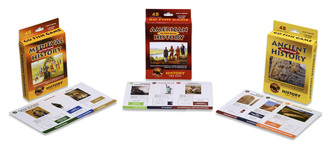
The Go Fish Game is a card game containing 50 cards depicting historical images in 12 different categories. Each set can be used to play 4 different games. The suggested ages are 5 and older (reading necessary)

  1.  Go Fish: This is the standard Go Fish we all grew up playing with a historical twist. Players must collect all 4 cards in each category before laying down their match.
  2. Collect the Cards: Players are read historical fact hints and try and guess which image is on the card.
  3. Chronology: Assemble the cards in chronological order in the fastest time!
  4. Geography: Players try to assemble all the cards under the correct continent in the fastest time.


What did we think?


We recieved the Ancient History version the the Go Fish Game. Cale and Cohen were excited to get started as soon as it arrived! The cards were well made, durable and nicely illustrated. They even stood up to my bunch who all seem to bend cards while playing games like these.


 What we liked best:

  • Go Fish is not my favorite game. Actually, my kids ask to play all the time and I usually suggest another game. To me it's always been sort of a pointless game, but I really enjoyed playing this with the kids. The historical facts gave a point to the game and added educational value. If you are going to play Go Fish go for one like this!
  • I liked that there were multiple games to be played with the deck. My oldest is too "old" for games like go fish, but does like trivia games so the Collect the Cards Game was right up his alley. Where as Go Fish suits the middle boys just fine.
  • The game does not overpower with factual information, but in the course of playing you learn historical association and facts. It is a gateway to finding more information. And questions like What is Stonehenge? or Who is Socrates? were heard often. 

What we had trouble with:


Over all we loved this game! And the kids have asked to play at least twice a week. The only thing  I had a little bit of a problem with was the hints given in the Collect the Cards version of the game were very vague and often only one or two words. The game has an opportunity to really teach what each of the images are about, if they only added a little more information to these hints.

Where to Buy:

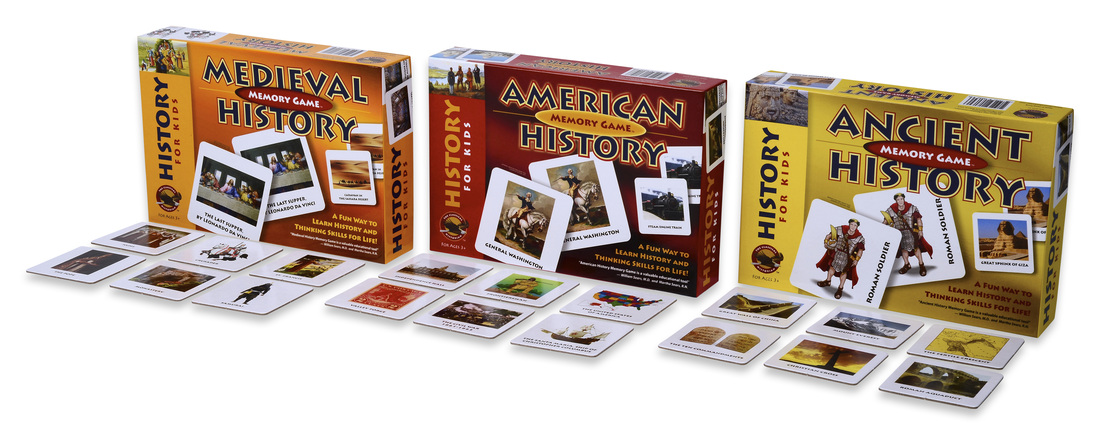
 The Classical Historian offers 3 versions of the Go Fish Game: Ancient History, Medieval History and American History. They can be purchased for $11.95 each or $29.95 for all 3.


They also have a Memory Game version of the same 3 time periods which can be purchased for  $14.95 each or $39.95 for all 3. I think this looks perfect for the younger, non-reading set as well as the older kids.


The Classical Historian also offers a variety of complete history curriculum for grades 6 and up. See their website for full information.


Wednesday

{Review} My Home School Grades


At this point in our homeschooling journey, I don't really give that many grades. Actually the only thing that we grade is math and that is mostly because Teaching Textbooks does that for me. But I have never actually averaged all those lessons and tests up into a final grade. Nevertheless, when I was given the chance to try out My Home School Grades all it took was one look at their website for me to be excited to try it out. 

About the Product:


My Home School Grades is a very simple web application (accessible on your computer, smartphone or tablet). It's a way to keep track of your children's classes, grades and activities and in the end produce a very simple, professional transcript of their education. You can find all sorts of how-to videos on their website to get you started, but really they aren't needed since everything is laid out and very easy to navigate. 


You start by entering your student(s). Then you can add all of their classes. You can enter the class name, grade level, how many credits, if it's an AP/Honors course, if it's a Pass/Fail course, school year, subject, etc. My Home School Grades also made it very easy by providing some of the most common curricula for you, and if you are more of an unschooler or use a different curricula you can use the other/custom listing. 
Once you've added a class you can start adding grades. Simply type in the lessons, test, quizzes and the grade. You have option of grading by letter, fraction or by number. Based on your account settings final grades will automatically be shown as Percent number, Letter, or Letter +/-. Some of the curriculum choices have their lessons already names and listed so that all you have to do is enter in the grade. You also have the option of entering just a final grade, as well as entering the grades for those classes earned through dual enrollment.


All of the calculating has been done for you. You can also weight the lessons, quizzes, tests and labs differently in order to calculate the final grade in a way you want. I also wanted to point out the flexibility here- even if you are an unschooler or don't use a lot of pre-made curricula, your child will still need some sort of high school transcript in order to graduate. You can uses these 4 categories- lessons, quizzes, tests and labs- as any thing you want. To you they can mean anything you deem an important part of their learning process and gauge of their comprehension.


You can also add all of your child's extracurricular activities and achievements. You can choose for a pre-populated list that includes categories such as work, community service, Scouts, 4-H, school, church, etc. You can add a name and description to the activity as well as listing any awards and references to go with it.


The second part of My Home School Grades is the transcript. They take all of the information you enter over the years and create a very nice looking transcript listed by grade level. You can choose to start the transcript at any level or just include the High School years. You can export multiple transcripts so you can include a comprehensive, all grades one for your files and a more official high-school only one for graduation and college applications. Also included on the transcript are the calculated GPA, points and credits for each year as well as at graduation.

My Thoughts on this Application:

Honestly, I loved it. It was easy to set up, easy to navigate, and easy to use. Some of the things I liked most:
  • The fact that all the calculations are done for you. No matter how you enter the grades- fraction, percent, letter- in the end the grades are listed uniformly how you want them.
  • The customer service is wonderful! Any problems, questions, suggestions, etc you have I have no doubt the creators of this program will do what they can to help. They truly want this to be accessible and useable for all homeschoolers.
  • I loved the transcripts. It's part of who I am, but I have always loved the look of lists like these and I think their transcripts are done simply and beautifully with all the right information included. There is also just enough flexibility so that you can choose certain elements to include or leave out.
The only bad thing to come out of using this program is that now high school is very much on my mind. But I guess seeing as that next year is the last year before we move into high school I guess I should be starting to think about it a little more!

How to get it for yourself:


My Home School Grades is very affordably priced at $49.99 for a yearly membership! You can also pay monthly at a rate of $5.99/month. These rates include any future upgrades and additions to the application as well as unlimited students and free support. They offer a 30 day money-back guarantee, so you can see for yourself how great this application is and how it will work for your family!

**UPDATE: My Home School Grades  has made LOTS of changes and added many, many features since this review was written. My oldest is in high school now and this program has been so valuable in planning his high school classes, activities and keeping track of grades! **


Friday

{Review} Come on an Ooka Island Adventure!


Reading. It's one of the most important skills anyone can have. It's also one of the most stressful parts of homeschooling. I have successfully taught 3 of my 5 kids to read. I was not blessed with self-starters or motivated readers. None of my 3 oldest taught themselves, none of them zipped through words quickly and effortlessly, and none read for pleasure for a long time. You would think that having done it 3 times before, teaching #4 would be a breeze. But like with most things, my kids are all very different and what works for one definitely doesn't work for the next. Lakin and I are in a frustrating place right now in his reading journey. He's stubborn, a perfectionist, and doesn't have a huge attention span. We are making slow but steady progress, and I will take any help I can get when it comes to teaching how to read. I am a firm believer that practice makes perfect, so the more words, books, games that have to do with language the better.

Over the years I have used many different computer programs aimed at teaching phonics and language skills. I have used CD based programs, free website, subscription based websites and free trials of many more. So when I was asked to try out Ooka Island I was pretty excited. Like I said- I will take any help I can get in hopes that it will help make reading click!


About the Product:

Ooka Island is learn to read game designed for kids at the Pre-K to 2nd Grade level. It teaches phonics, phonemic awareness, vocabulary, fluency, comprehension. It is a self contained application on your computer, available for both Mac and PC, that adapts to your child based on their abilities as they go through the program.


Ooka Island follows a cycle of guided play, e-reader and free play to help keep the kids engaged and eager to learn. The Ooka Island map is full of fun and games such as Alphabet Mountain, The Cake Factory and Bubbly Trubbly that teach things phonics, blending, decoding and sequencing. The player moves through these games during the guided part of each lesson. Then they enter the Popcorn Library to read and earn books. In this e-reader section they listen to a book and complete comprehension activities. You can even print out a book path for them to place stickers on as they complete each book.


In addition to the application, there is a online component to the game where parents can go to see their child's progress. You can view all sorts of reports and analysis and see how your child is progressing. You can also find resources to use offline such as workbooks, book paths, certificates and even music to help keep your child excited!

What did we think?


Lakin LOVES games like this, and he was so excited when it came in the mail. It is very visually appealing which means kids are excited right off the bat.

What I liked most:
  • I like that is it self adapting. We have used programs in the past that don't adapt as the child progresses and this leads to boredom or frustration as things become too easy or too hard. 
  • This program does a really good job of keeping interest alive. The games change with enough frequency and they have enough movement and story lines involved to keep you thinking. 
  • Extra resources. Games like this are only part of teaching your child to read. It's still very hands on with parental involvement required. The activity books are great reinforcement for what they are learning in the game and the other resources work to keep the excitement alive. 
  • I liked that it had a lot of directed activities. This meant that Lakin couldn't keep repeating his favorite games  and he couldn't skip those he didn't particularly like. 


Things to think about:

We've tried quite a few computer based games in our reading journey, and what I have learned is that they all have good qualities and they all share a common goal. The biggest variable in the equation is your child. Different kids prefer different games, so I have always been a fan of the "free trial" offered by many companies. This way I can know for sure if my child is going to mesh well with the game. Being a self contained application, this might be hard to do, but I think some sort of Demo CD or online sample games might be a good idea so that customers, and their kids, can get a good feel for the game before making their purchase.  That being said, my child really enjoyed his time on Ooka Island, and I can see that his skills improved because of it.

Want to purchase Ooka Island for yourself?


Ooka Island can be purchased from their website for the following prices:

Individual:
 
    $12.95 per month or $124.95 annually

Family (of up to 4 children):

   $19.95 per month or $149.95 annually


 And right now you can get up to 30% off your subscription by clicking here!